How to Use UTMs Without Ruining Your GA4 Reporting

UTM parameters tell GA4 where a visit came from when platform data is not enough. They only work when the naming is consistent, because small differences such as Paid_Social and paid-social create separate report rows.
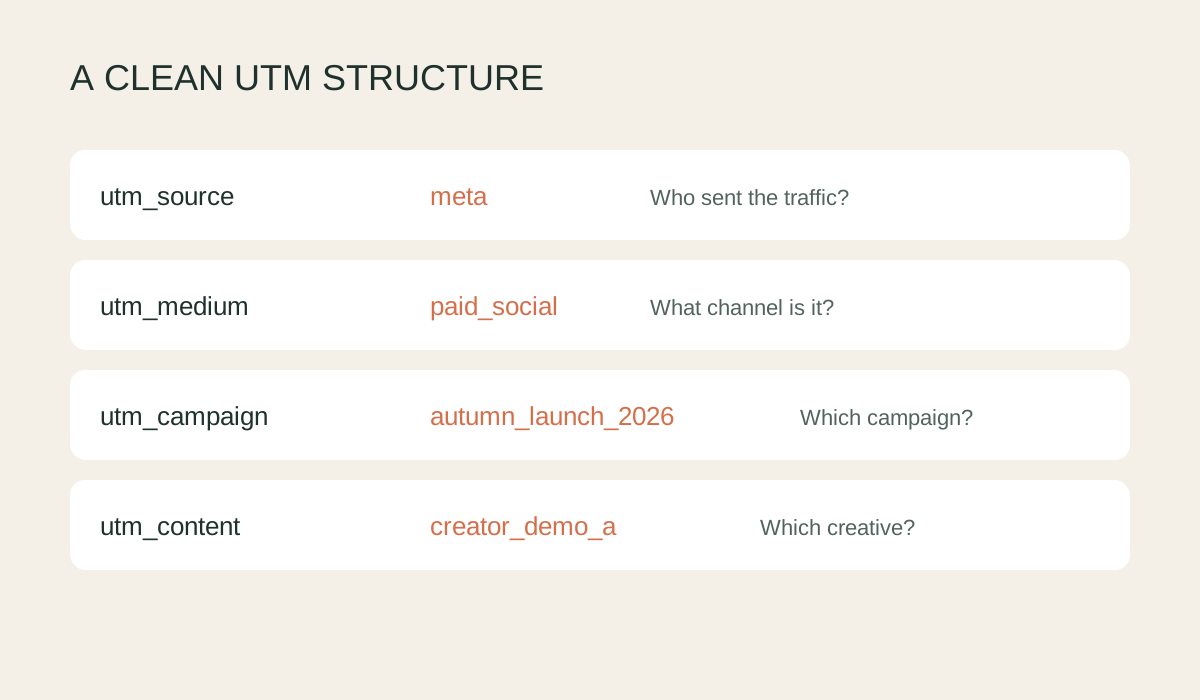
Build a clean UTM
- Start with the final landing page. Use the canonical page URL without old UTMs, preview parameters or unnecessary fragments.
- Set
utm_source. Use the platform or partner sending the traffic, such as meta, google, klaviyo or creator_name. Keep a controlled lowercase naming list. - Set
utm_medium. Describe the channel consistently, such as paid_social, email, affiliate or influencer. Do not switch between cpc, paid-social and social_paid for the same activity. - Set
utm_campaign. Use a recognisable campaign name that can survive beyond one advert, such as autumn_launch_2026. Avoid spaces and unexplained abbreviations. - Use optional fields deliberately. Put creative or placement in
utm_contentand paid-search terms inutm_term. Do not repeat the same value in every field. - Generate and test the URL. Open it in an incognito window, check the page loads, complete a test visit and confirm source, medium and campaign appear in GA4 Realtime or DebugView.
- Save it centrally. Keep a shared UTM builder or naming sheet so agencies, creators and internal teams use the same values.
Protect reporting quality
Never add UTMs to internal website links. Doing so starts a new attributed session and overwrites the visitor's real acquisition source. Use event tracking for internal banners and navigation instead.
Before launch, check capitalisation, spelling, redirect behaviour and whether the destination strips parameters. Review GA4 acquisition rows monthly for duplicated naming, then correct the process rather than manually combining bad labels forever.
Verification notes
Use lowercase controlled values and set the relevant source, medium and campaign parameters together. Never add UTMs to internal links because they can replace the acquisition source for a new session.
Source checked
This guide was checked against Google Analytics campaign URL guidance.

Olivia Robinson
After arriving at a fork in the road in my career I decided to take the plunge and wander purposefully, with determination, into the maelstrom of consultancy in online sales. It's been the most exciting decision I've ever made and I've been able to work with some of the most interesting brands the UK has to offer. I specialise in the intersection of ecommerce and marketing, the part of the Venn diagram that eCommerce & Marketing people don't like to occupy because it takes a lot of plate spinning - this is where I thrive.
We will happily conduct a free, no-obligation audit on your digital channels, with several key takeaways you can action yourself or request for us to assist you with. It's completey free for now but it is a limited time offer.
Explore more blogs